Articles by "iphone"

Showing posts with label iphone. Show all posts


Here are iOS 10 beta download, features, and release date rumors that we know so far. Apple is expected to unveil iOS 10 for iPhone, iPad, iPod touch at WWDC 2016.

iOS 10 should be next for Apple, as it launched iOS 9.3 this week. Look for hints of an iOS 10 beta in the next three months.

Apple's iOS 10 update is the milestone software version for the iPhone and iPad, and its release date is currently three months away, according to the company's routine schedule.


Downloading the iOS 10 beta this summer and the final release a few weeks later won't end up being a big surprise, but where Apple takes the mobile operating system is still a mystery.

We're just now reporting on the first iOS 10 update rumors, including new interface and app features that haven't been pushed out to your iPhone 6S and iPad Pro 12.9 as part of iOS 9.3.

Apple is preparing the redesigned iPhone 7, according to the latest leaks, and that means the interface may take on a few surprises. Here's what we've heard and want.


iOS 10 Release Date

In a similar fashion to the initial beta download predictions above, Apple has historically been very predictable when it comes to making a major version of iOS publicly available. Going by that, we expect final version of iOS 10 going live around the world in the same week as Apple’s next-generation iPhone going on sale, which will be in September this year.

We will be continuously updating this post as we learn more about the upcoming rumored features for iOS 10, so keep checking back and stay tuned!


iOS 10 Features (Rumored)

From a purely visual and aesthetic standpoint, iOS 10 will likely be identical to what we currently have with iOS 9. Those that are secretly hoping for a huge aesthetic overhaul – like what we saw with the transition from iOS 6 to iOS 7 – are going to be left largely disappointed. But those who are more interested in new features than UI overhaul will be pleased to know that iOS 10 is rumored to bring a number of new features to the table.

The first one of those could be new emojis. As has been previously reported, an agreement by the Unicode Consortium could potentially pave the way for 74 additional emoji characters to find their way onto Apple’s iOS 10. Those new emoji characters have already been agreed on by the Consortium, and as such are all set to be featured in Unicode 9.0, schedule to be released mid-2016. Perfect timing for initial developer previews of iOS 10.


Apple Photos app in iOS 10 could bring back some much loved features from the iPhoto experience that was killed off by Apple. The level of integration is currently unknown, but could include tools such as having the ability to edit EXIF data directly, and being able to edit specific areas of a photo within the app. There’s also the possibility of Apple adding face detection in iOS Photos app, something which the Mac version of the app has but the iOS one doesn’t. In short, expect a big overhaul of Photos app in iOS 10.


iOS 10 wishlist: Features we hope will make it to iOS 10
We at Macworld UK put our heads together and thought about some of the features we’d like to see included in iOS 10, from small changes to completely new ideas – and here are our best.

Ability to change video resolution in-app:
One of the selling points of the iPhone 6s and 6s Plus is that they’re able to record in full 4K resolution at 30fps, as well as the standard 1080p at 60fps or 30fps. The only issue we have is that there is no easy way to change between the resolutions from within the Camera app, and we have to exit the app, head to Settings > Camera to be able to change it.

Certain situations, such as filming in low light, require a lower frame rate (less frames = more light captured) and changing it manually takes around 10-15 seconds, which isn’t ideal. We would love a way to quickly change the resolution and frame rate, possibly by tapping an icon in the Camera app. It’s a simple change to make, and would be largely appreciated by those that like to capture video on their iPhones.

View Favourites in Contacts app:
Another fairly simple change we’d like to see made in iOS 10 is the ability to view and edit the list of favourites, currently only found in the Phone app. It makes sense to be able to access your favourite contacts from within the Contacts app, and we’re not quite sure why Apple hasn’t yet added this functionality. Sometimes we want easy access to our contacts for other reasons, not just for calling!

Customise the Control Center:
The Control Center is one of the most underrated features of iOS, enabling easy access to various toggles and controls without having to open the Settings app. The only issue we have is that we can’t personalise any of the toggles, as we’d like to be able to swap out little-used toggles for shortcuts to apps/settings we frequently use. For example, we very rarely use the Control Center to access the Calculator app – we’d much prefer easy access to Twitter, for example.

While on the topic of the Control Center, we'd like to be able to quickly access the settings of each of the toggles with a force touch on the latest iPhones. For example, we’d like to be able to force press the Wi-Fi toggle to quickly access the Wi-Fi menu to connect to a new network.

Seo Tag: iOS 10, iOS 10 Beta, iPhone


New iPhone 7 Concept Features An All-Screen Design With iOS 10!

The new iPhone 7 concept, forged by Marek Weidlich, is an interesting take on design. For starters, the focus is entirely on the device’s display, where the Home button has been removed for good and has been replaced by a software one. Speaking of software, the device runs on top of iOS 10, and on the face of things it looks exactly like watchOS that powers the Apple Watch. We have to admit that the software looks absolutely stunning on what the designer is calling the ‘never ending screen.’

The back of the device has also been given a complete makeover, with the camera sensor now living on the top center of the casing. Also, the concept designer images a new feature for the iPhone 7 which he is calling ‘iArt,’ which basically lets you swap out back covers of the smartphone itself to give users more choice on the customization front. We can’t say that we are fans of this addition, but we’re certain some people will dig the idea more than others.


Features depicted include: 

  • 3D Touch for different options per button
  • Long press to move buttons around
  • Edit button to replace buttons
  • Dark mode


The iPhone 7 rumors are already coming in a flurry, and along with them lots of different concepts and mockups. This year’s newest smartphones from the big Apple will have a different design (as it does every other year), which is always exciting to look forward to.

One of the more interesting concept iPhone 7 videos so far was made by iPhone-Tricks.com, which showcases a bezel-less OLED display and the removal of the physical home button. These choices are inspired by a few rumors lately, which say that Apple has patented technology that would support these features.

Even more interesting is the mockup of iOS 10. The concept video shows off what Apple might be able to do with a digital home button that functions as a way to jump to an app on the lock screen, as well as using it for swipes like a trackpad. The mockup also has a pretty cool idea on the home screen that would finally bring widgets to iOS. The iPhone 7 design is probably more likely than the iOS 10 stuff, both are pretty fun to see in action.

iOS 10 release date rumours: When will Apple announce iOS 10?

The big question on everybody's lips is "when will iOS 10 be released?" and while we can't give you an exact date, we can look at past events and estimate its arrival. Typically, Apple announces its new iteration of iOS every June at its WWDC event in the US, with an Autumn release date. This three/four-month gap between the announcement and its release gives developers a chance to squash any bugs and add any new features to their third-party iOS apps, in time for general release.

This is probably the easiest thing to predict. Following on from the usual release schedule of the past few years, we would expect to see iOS 10 ready and available to download towards the end of September. Probably on the same week as the iPhone 7 hits.

iOS 10 new features rumours: Users will be able to hide Apple's own apps

App Advice has discovered some new code that's been added to every app on the App Store, and it suggests that Apple is planning to add the ability to hide its own apps.

This code adds an entry labelled "is First Party Hideable App" for each app, and while this entry is universally labelled as "false" at present, the implication is that at some point in the near future you'll be able to hide at least some of Apple's own apps (such as Stocks, Game Center, Tips and so on) so they're not visible on your Home screen. Presumably not all, otherwise having two separate entries for "is First Party" and "is First Party Hideable App" would be redundant.

The most obvious time to unveiled this new feature would be at WWDC 2016, alongside iOS 10 - although whether such a feature would be exclusive to iOS 10 users, or merely coincide with its launch, remains to be seen.


This would be a highly popular feature, of course, given how many people search for ways to delete or hide preinstalled apps. It's disappointing that Apple is focusing on hiding rather than deleting its own apps, however - the (admittedly small amount of) storage space will still be wasted - but it would be a good start.

As it stands now, the only iOS 10 feature we’ve heard rumblings about centers on a new service dubbed iCloud Voicemail that would use Siri to answer calls and transcribe voice messages.

In the months ahead, it’ll be interesting to see what type of cool new features Apple plans to incorporate into iOS 10, especially given that iOS 9 last year was largely focused on under-the-hood optimizations designed to improve the overall user experience and eliminate pesky bugs and performance issues.

Seo Tag: ios 10 Concept


iOS 10 RELEASE DATE: WHEN IS IT COMING OUT?

This is probably the easiest thing to predict. Following on from the usual release schedule of the past few years, we would expect to see iOS 10 ready and available to download towards the end of September. Probably on the same week as the iPhone 7 hits.


iOS 10: what we want to see

iOS 10 should be next for Apple, as it launched iOS 9.3 this week. Look for hints of an iOS 10 beta in the next three months.

Apple's iOS 10 update is the milestone software version for the iPhone and iPad, and its release date is currently three months away, according to the company's routine schedule.

Downloading the iOS 10 beta this summer and the final release a few weeks later won't end up being a big surprise, but where Apple takes the mobile operating system is still a mystery.

We're just now reporting on the first iOS 10 update rumors, including new interface and app features that haven't been pushed out to your iPhone 6S and iPad Pro 12.9 as part of iOS 9.3.

Apple is preparing the redesigned iPhone 7, according to the latest leaks, and that means the interface may take on a few surprises. Here's what we've heard and want.

iOS 10 Might Introduce a New Feature We’ve All Been Waiting For:

CEO Tim Cook last year confirmed Apple engineers were "looking into" the possibility

Access to Multiple Users
Multiple users support is specially useful for iPad users. It will let users use a single gadget which is basically very convenient in the household environment. Multiple users can create different accounts, no one can get access to the personal document of the other user. This feature is already present on the latest Android platform, so we are expecting this feature to be integrated in the next generation iOS platform as well. If this feature is incorporated in iOS 10, then iPads will also become the first choice of the professionals in different fields.

Voice Transcriber
Every year Siri is being updated by Apple so we are expecting Apple to follow the same trend even today. Rumor has it that iOS 10’s Siri will have the capacity to transcribe voice message so that users can read the message instead of hearing it. Moreover, there are also rumors that if an user is not picking up the call, then Siri can tell the caller the reason behind that.

More Options for Controlling Volume
If you watch a video on your iPhone or iPad, then you have to first turn on the video and then control its volume. In iOS 9, there are different options for controlling the volume of the video or any other media. This is really bothersome specially if you have started up YouTube in the middle of the night or in a public place. We are expecting iOS 10 to come with different options to control volume for different kinds of media. This will be really helpful for the users.

Touch ID
Touch ID of iOS 9 is definitely much better in comparison to the previous version of the software. However, it has become so quick that it becomes difficult for users to respond so quickly. So Apple developers need to slow down the speed of its Touch ID. We have heard Apple users complaining that the notifications shown on the home screen disappear almost instantly when the screen is activated. So this problem needs to be addressed in the next generation platform so that the users can use their phone with ease.

Modifiable Control Center  
The default control center of iOS 9 needs to be modified so that users will have the option of customizing it according the needs of the users. All the icons like watch, phone mode and others are present in the control center and all of that is not needed by us. Therefore, we would be happy to see a customizable control center so that we can choose the apps we want to see their according to our needs.

Innovations In 3D Touch
Though at first users could not understand the importance of the 3D Touch feature but when it was made available to different apps of the phone, then they came to realize the importance of the app. Now we would also like to see the 3D Touch feature extended to the control center of the software. If this feature is being extended to the control center, then by simply pressing the menus in the control center, we would get access to the settings of that particular menu. This would be really helpful for all the users.

Change Position of Apple News
The Apple News app of iOS 9 is really useful and the publications that are available on it are very good. However, one change that should be incorporated within it is its position. Apple News is in the right most menu of the screen and thus most users do not even know that this valuable app is present in their phone. It would better if this app is moved to the left menu, then it would be properly used by the users.

Compatibility

As far as iOS 10’s compatibility is concerned, we think that it will not be available to the five years old phones. But this OS will be available to all other iPhones and iPads that were released thereafter. Rumor has it that the new OS requires more space and RAM support which is not available in iPhone 4s and iPad 2. So it will not be possible to install this software in these gadgets. All the phones released thereafter, i.e. iPhone 5 series and iPhone 6 series can handle iOS 10 with ease. Even iPad Pro, iPad Air 2, iPad Air, iPad Mini 2,3 and 4 will also get access to the updated software.

iOS 10 beta:

The iOS 10 beta should be back given the initial rousing success of the iOS 9 beta to squash software glitches. That means you can anticipate three ways to download the operating system update once iOS 10 becomes available.


Apple Developer Program members will be the first to install iOS 10, likely in June. That requires enrolling in the official developer program and paying a fee.

Since everyone wants everything for free these days, you can wait a few weeks, typically in July, to test out iOS 10 early via the public beta. It requires jumping through some hoops on Apple's website, but registration takes no more than a few minutes of your time.


The iOS 9 beta program was more unfinished than it was buggy. I counted just a few missing features, not glitches, so it wasn't a hassle to download a year ago. And it was free and an over-the-air update, so it's a friendly middle ground if you want to try iOS 10 before most everyone else.

iOS 10 compatibility

Amazingly, iOS 9 didn't cut anyone out of the mix when the update rolled out to devices in September. The iPhone 4S and iPad 2 still work with the latest operating system update.

That may not happen again given the simple fact that iOS 10 may require more than 512MB of RAM.


We really thought both devices would be axed when the iOS 9 update became available. Because these Apple devices are going to be five years old by the time iOS 10 comes out, we think it's time to put the clinging-to-life 30-pin dock-equipped phone and tablet to rest.

Expect the iPhone 6S, iPhone 6, iPhone 5S, iPhone 5, iPhone 5C, and the bigger iPhone 6S Plus and iPhone 6 Plus to handle iOS 10 without a hitch. Add the new iPhone SE to the roster, too.

Same goes for the iPad Pro 9.7 and 12.9, iPad Air 2, iPad Air, iPad mini 4, iPad mini 3, iPad mini 2 and maybe even the original iPad mini. Also, not to be forgotten, the iPod Touch 6th gen should be fine.

Related Posts: How to Set up iOS 9.3 on iPhone and iPad Easily

How to make an archived back up your iPhone or iPad Easily

Seo Tag: iPhone, iTab, iOS 10, Apple iOS 10 Features


How to Set up iOS 9.3 on iPhone and iPad Easily

iOS 9 marked the first time Apple has ever released a new version of the iPhone and iPad operating system as a public beta. With iOS 9.3, Apple is once again letting almost everyone test out the new features and provide feedback before it goes into wide release this spring. But it also means people will have to go through the public beta download and install process. While it's not complicated, it is different. So, we're going to walk you through it and give you a place to ask questions if you need extra help.

Step 1: Sign up To The Public Beta Programme

First up, make sure your iDevice is running the latest version of iOS (that’s 9.2.1) and you need to head on over to Apple’s iOS public beta website. Open up Safari on your phone and open up beta.apple.com and then tap ‘Sign Up’. Unlike the developer beta that Apple also runs, the public one is completely free. Sign in with your Apple ID and you’re set.


Step 2: Enrol Your Device

Once you’ve signed up, you’ll need to enroll your device into the developer programme. Scroll down to the ‘Getting Started’ section and tap ‘Enroll your device’. Simple.


Step 3: Creat a Back-up

While Apple’s public beta updates generally seem fairly stable, as with pre-release pieces of software there’s always that small risk. So, Apple advises you to create a backup of your phone before you install the beta.

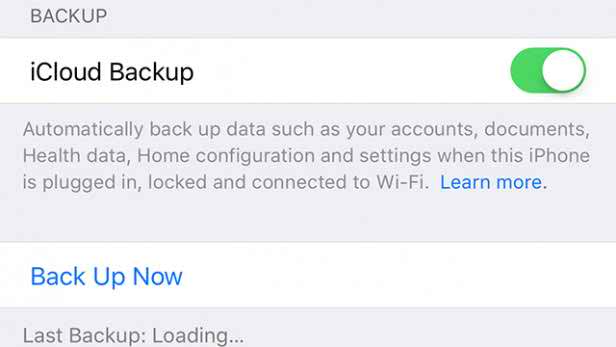
This can either be done by plugging your phone into a computer and going through the chore that is iTunes, or more simply heading into Settings > iCloud > Backup and tapping ‘backup now’

You May Also Read: How to make an archived back up your iPhone or iPad Easily


Step 4: Download The Profile

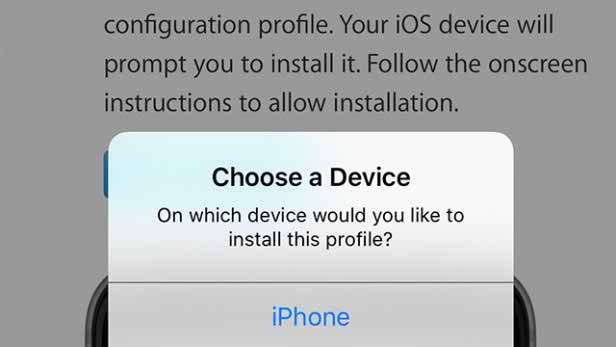
For your device to be able to download the iOS 9.3 beta update, you’ll need to install a ‘profile’. All this does is tell your iPhone or iPad where to look for the 9.3 software. On your device, go to beta.apple.com/profile and accept the pop-up that follows.

Your phone will restart and profile will be added.


Step 5: Install IOS 9.3

Right, now you’re all set to install iOS 9.3. Head into Settings > General > Software Update and the update should show. Tap Download and Install and then, well, wait. It’ll download, ask you to confirm and then reboot and install.

It’s worth noting that even though the download is 1.7GB you’ll still need about 2.5GB free space for it to actually install, which is a bit of a pain if you’re toting a 16GB device like us.

Once your phone has restarted, it’ll be running iOS 9.3, but you’ll notice a new app called ‘Feedback’. This is where you can let Apple know about any bugs or problems you’re finding with the software.


iOS 9.3 Changelog :

1. iOS 9.3 paired with WatchOS 2.2 lets you now pair multiple Apple Watch units with iPhone.

2. Multi User support for iPads.

3. Siri gets Hebrew support.

4. Ton of bug fixes.


Warning:
Beta means beta. This isn't an early access program. It's pre-release software. That means put it on a secondary device if you have one and, if you don't, think really hard before installing it on your primary device. If you rely on your iPhone or iPad for critical communications or to run your life or business, you may want to stay clear until the official release this fall.

Seo Tag: iPhone, iOS 9.3 Set-up, How to Set up iOS 9.3, How to Set up iOS 9.3 on iPhone and iPad

How to make an archived back up your iPhone or iPad Easily

Today I'm going to show you How to make an archived back up your iPhone or iPad in a easy way.

Before you begin, make sure you back up your iPhone or iPad. While the beta process is fairly straight forward, any time you make any significant change to your device you risk problems. And with your personal data, it's always—always!—better to be safe than sorry. Even if you back up every night, you'll want to make sure it's absolutely up-to-date.

Step 1: Plug iPhone or iPad into your Mac or Windows PC.

Step 2: Launch iTunes.

Step 3: Click on the iPhone or iPad icon in the menu bar when it appears.

Step 4: Make sure backup is set to This Computer. (And enable Encrypted backup — it's worth it!)

Step 5: Click on Back Up Now. (Click on Encrypt Backup and add a password — you want the security.)

Step 6: Back up Apps, if asked.

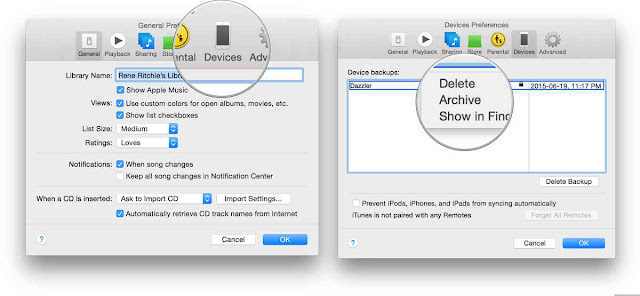
Step 7: Press Command, to open Preferences. (Or go to iTunes in the menu bar and click on Preferences.

Step 8: Click on the Devices tab.

Step 9: Option-click on your Backup and choose Archive.


Archiving will prevent your iOS 8.4 backup from being overwritten by an iOS 9 backup in the future, should you want to revert for any reason.

You May Like: How to Set up iOS 9.3 on iPhone and iPad Easily

Seo Tag: iPhone, iPad, iPhone Back up, iPad Back up,  back up your iPhone or iPad


iOS 9.3.1 / 9.3 Jailbreak For iPhone And iPad Update Status

Jailbreak iOS 9.3 Update; Pangu & TaiG VS iOS 9.3 Release! What to Expect:

Recently ensuing Apple’s March media event, the company released iOS 9.3 to the general public: the next major firmware release that offers native f.lux functionality, improvements to performance, password protection to the default Notes app and more. If you remember, iOS 9.3 is the firmware that jailbreak developers have likely been waiting on for months now – opting out of jailbreaking iOS 9.2.1 in favor of iOS 9.3 may have been the smart move, but do you know why? In addition to discussing iOS 9.3 in general, we’ll also delve into the basics as to why an iOS 9.3 jailbreak makes sense in today’s article; continue reading past the break.

iOS 9.3 and Jailbreak Updates


The passion within the jailbreak community was reignited with the surprise launch of the iOS 9.1 Pangu jailbreak in early March. Just like the original Pangu 9 jailbreak for iOS 9.0.x, this solution landed literally out of nowhere. Not that anyone is complaining. It’s all well and good having this Windows and Mac compatible tool for iOS 9.1, but it does raise the immediate question of “what’s the current state of an iOS 9.3.1 and 9.3 jailbreak?”.

Apple released iOS 9.3.1 to patch a bug related to how universal links worked in iOS after iOS 9.3 randomly started crashing devices whenever links were tapped in Safari and other apps.

But now that we have iOS 9.3.1 available for download, is a jailbreak available or coming for it? Well from security perspective, not much has changed in iOS 9.3.1 compared to iOS 9.3. Apple’s security updates page doesn’t list any further changes for iOS 9.3.1 which means whatever vulnerabilities Apple patched in iOS 9.3 remains as is in iOS 9.3.1. So technically, if there’s an exploit out there which worked in iOS 9.3, it should work on iOS 9.3.1 as well.

Now those of you who follow our regular jailbreak updates closely will be aware that Italian developer Luca Tedesco has been involved in a lot of activity of late. That involvement included successfully jailbreaking and posting a video showing jailbroken iOS 9.3 on an iPhone shortly after Apple’s initial release of the first iOS 9.3 beta. The video evidence coming from the Italian shows that iOS 9.3 and possibly iOS 9.3.1 are both capable of being jailbroken. The problem though is that he has a number times made it clear that his exploit is private and he doesn’t plan to release it as a public jailbreak.

New iOS 9.3 Firmware:


Starting with iOS 9.3 as a firmware update first, as mentioned above, 9.3 offers Night Shift (changes a device’s color warmth at night for a more pleasant viewing experience), enables Notes to both passcode and Touch ID lock, an improved “For You” algorithm in the Apple News app, a redesigned dashboard in the Health app, additional Car Play functionality and expands upon Apple’s software support for educators.


So where does that leave us? Chinese jailbreak teams Pangu and TaiG usually don’t provide any updates prior to a release. At least that is how it has been with their recent jailbreak releases. At this point in time with iOS 9.3.1 out and the latest Apple devices, iPhone SE and 9.7-inch iPad Pro available in stores, we can only hope that they have something cooking for jailbreak community and will release once it’s ready for primetime.

So then should you update to iOS 9.3.1? Well if you are on iOS 9.3, you probably should because iOS 9.3 has a nasty universal links bug and updating to 9.3.1 shouldn’t hurt your chances of jailbreaking in future as iOS 9.3 and 9.3.1 are essentially same from security perspective, as also explained earlier. If you are on iOS 9.2.1 though and care a lot about jailbreaking, you should probably stay there and wait for a potential jailbreak release. If there’s anything the recent release of iOS 9.1 jailbreak has shown us, it’s to stay on as low firmware version as possible and wait patiently for the next jailbreak release. Also, since iOS 9.2.1 is still being signed as of this writing, you can downgrade to it from iOS 9.3/9.3.1 now if you want to. Once the signing window is over, downgrading from iOS 9.3/9.3.1 to 9.2.1 will no longer be possible.

To recap, there is currently no public jailbreak available for iOS 9.2, 9.2.1, 9.3 and the latest iOS 9.3.1. Those of you who care about security and don’t want jailbreaks should update to the latest iOS 9.3.1. Those who don’t and want a jailbreak should stay or downgrade to iOS 9.2.1 and wait for the next jailbreak release.

As always, we will keep bringing you latest updates on the jailbreak front as soon as we hear more on it. So stay tuned with us.

You May Need: How to Set up iOS 9.3 on iPhone and iPad Easily

Seo Tag: iphone, ipad, iOS 9.3, 9.3.1 Jailbreak, 9.3.1 Jailbreak For iPhone And iPad

Latest iOS 9.2.1, iOS 9.2 Jailbreak Status


Jailbreak iOS 9.2, iOS 9.2.1

Apple released iOS 9.2 on December 8th, which includes several bug fixes, features and improvements such as support for AT&T’s NumberSync, iPhone support for Apple’s USB Camera Adapter, support for Mail Drop in Mail, improvements to Safari View Controller and lots more.

iOS 9.2.1 was released on January 19th with bug fixes and security updates.

Apple patched two vulnerabilities used in the Pangu iOS 9 Jailbreak in iOS 9.1, but Pangu team released a new version of their tool to jailbreak iOS 9.1. But you can’t use Pangu jailbreak to jailbreak iOS 9.2.1 or jailbreak iOS 9.2 on your iPhone, iPad or iPod touch currently. You also can’t downgrade to iOS 9.1 as Apple has stopped signing iOS 9.1 firmware file.


How to Jailbreak iOS 9.2 :

iOS 9.2 can be jailbroken using the three methods given below. Choose the one which best suits you and proceed with the jailbreaking for iOS 9.2.

System 1: Use the Pangu 9.2 Jailbreak app for untethered iOS 9.2 jailbreak for iPhone 6s , iPhone 6 and older devices

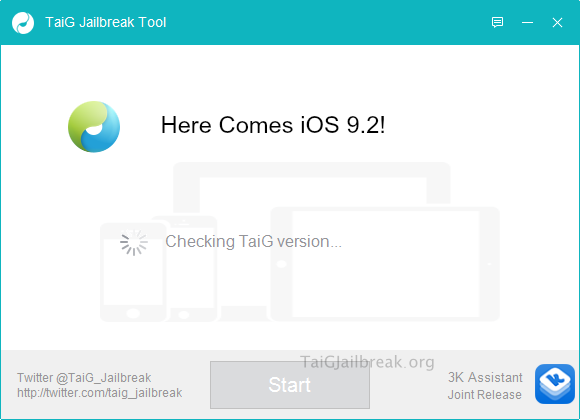
System 2: Using Taig 9.2 Jailbreak tool from Taig Team.

System 3: Use the Safari method to download Cydia iOS 9.2 app icon on your homescreen without PC . No Jailbreak required .

System 1 : Pangu 9.2 Jailbreak:


As you may already know, Pangu team was the first one who jailbroke iOS 9 using their latest Pangu 9 jailbreak tool. We have a link here dedicated to Pangu 9.2 jailbreak tool download.

System 2 : Taig 9.2 Jailbreak:


In a recent report it has come to light that Taig Team is secretly working on an iOS 9.2 jailbreak tool , aka Taig 9.2 [updated].

System 3 : Cydia iOS 9.2 App icon Download

This method is specially useful when you are waiting for an iOS 9.2 jailbreak installer to come out . It keeps you connected to Cydia iOS 9.2 jailbreak updates directly on your device without having to jailbreak it.

Step 1: First make sure you have iOS 9.2 Downloaded and installed on your device. You can check this by going to Settings > General > About . If you haven’t installed it yet, follow our iOS 9 installation tutorial, then proceed to Step 2 for more.

Step 2: Now launch the Safari browser on your device. Please note that using any other browser like Google Chrome , Opera will not work on this jailbreak method.


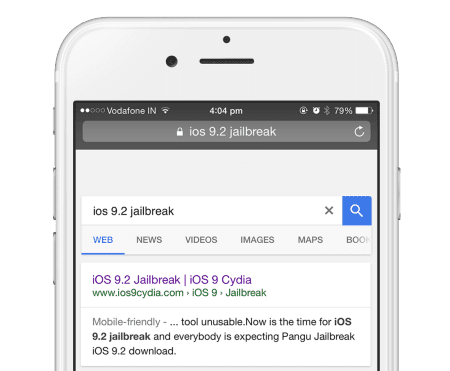
Step 3: Now search this term “ios 9.2 jailbreak” without the quotes as shown below . On the results page,

find the site with the url ios9cydia.com and tap on that. This page is specifically designed to download cydia app icon on iOS 9.2 devices.


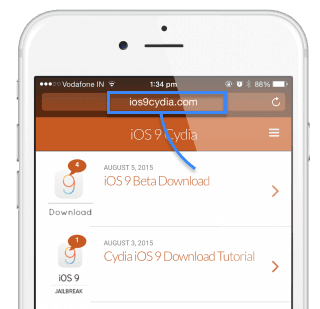
Step 4: If you cannot find the page on search , then simply type in this url ios9cydia.com in your Safari browser address bar which would then open the mobile version of the page as shown below.


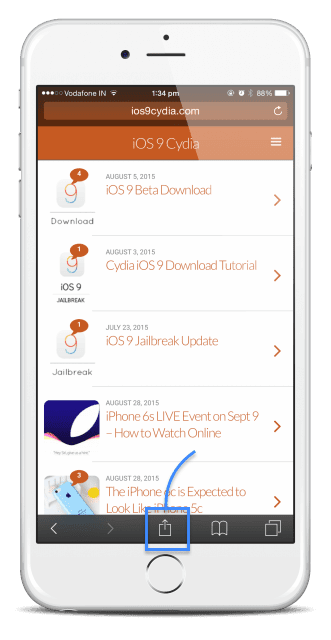
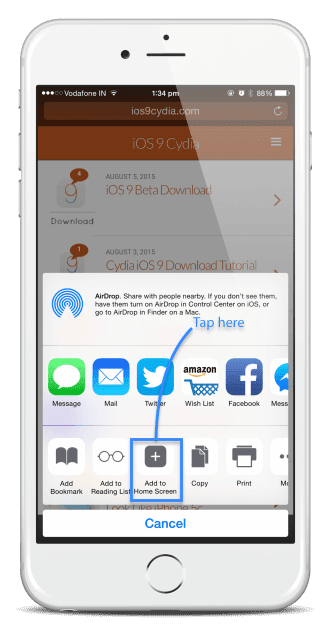
Step 5: Now in the bottom of the screen you will notice a UP arrow , Tap on that to bring in a new options page.


Step 6: Here you will get the option to Add to HomeScreen to download iOS 9 cydia on the phone . Tap on that.


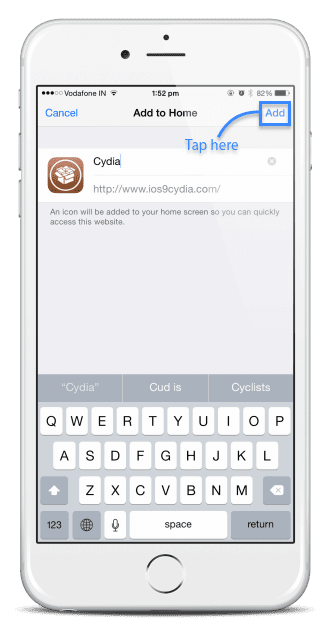
Step 7: This will allow you to name the cydia app , keep its name as Cydia and tap on Add to proceed.


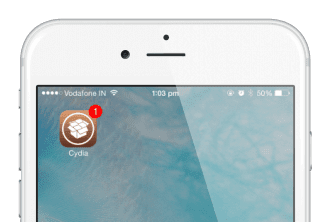
Step 8: You now got Cydia icon on iOS 9.2. Open the app icon to stay updated to iOS 9.2 jailbreak status.


You Can Also Watch This Video:


Coution: The steps explained above will help you download cydia app icon on iOS 9.2 supported devices . This methods works on iPhone and iPod Touch. iPad support is now available. This downloads the Cydia app icon without needing a PC or a Mac . Note that this Cydia app icon has limited functionality , and allows access to jailbreak updates only.

When iOS 9 betas were being rolled out by Apple, it was clear that the firmware was not easy to jailbreak. One of the biggest challenges in jailbreaking iOS 9 was to workaround the KPP (Kernel Patch Protections), which made it harder to jailbreak the firmware. But the Pangu team did find a way around and it released the Pangu 9 jailbreak tool to work with iOS 9.0.1.

Fast forward to now, iOS 9.1 final public version has been seeded to the iOS users globally, and it has reportedly patched a couple of exploits, thus making the Pangu 9 jailbreak incompatible with iOS 9.1. This means that the jailbreak teams looking to jailbreak iOS 9.2 will have to start fresh and find out new exploits in the firmware once the iOS 9.2 is seeded by the company.

Seo Tag: iphone, iOS 9.2.1, iOS 9.2 Jailbreak, iOS 9.2 Installation.

Author Name

Contact Form

Name

Email *

Message *

Powered by Blogger.